Locked Checkpoints

Following on from the previous post, I have now made the checkpoints that will be locked until activation. It wasn’t difficult to make the object however the script was a real pain. I’ve spent hours testing it. Basically what happens is both beams will move apart to their respective destinations and the portal beam will scale to its target size. Now all this happens over time, and I managed to get all of this to work however, it is very ‘dodgy’ you won’t notice in game, but from the scene view when the checkpoint is activated the beams move faster than the portal can scale. As a result it almost looks like the portal is trying to catch up with the pillars.

There is a few other things that occur when activating the checkpoint, the orb its self will turn green as a visual indication that the checkpoint has opened and then it will deactivate so it can no longer be triggered again.

Image

You can see from the image, the locked checkpoint and the unlocked or final result on the left.

Energy Orbs!

Time for the shootable objects. I had a really cool thought not long ago about having locked checkpoints. Basically the same as you may have seen before in older posts, but have the 2 pillars next to each other stopping the player from being able to fit in the gap. This could then be unlocked by shooting and hitting the energy orb and activating the pillar. Cool right? Yeah! Well I have designed the energy orb with a number of cool features, that really make it stand out. Basically its a sphere with a halo glow like so:

Image

This looks cool as it is but I wanted to adding something that would draw the players attention to it, so I added smaller orbs that would rotate around the main ball above. However not just move around it but orbit at a quick speed. This was tricky and took a lot of fiddling to get right. The code was actually really simple in the end. The new orbitable orb looked like this:

Image

Finally one more thing to get this to look cool is I wrote a small script that would apply a vertical force for several seconds and then would do the reverse, effectively bobbing up and down. I liked this so much I added this to the checkpoints as well.

Custom Skybox

I have bored of flying around a grey sky when testing my level, so I have implemented a skybox that I feel will match the games setting very nicely. I had design this skybox before, which has been used in a previous game, created by my self and a fellow student. So I have just taken it from my old Unity project and pieced if together in this new Game.

Skybox

As you can see it has a really nice feel, and it definitely suit this level really well. Its a simple effect but added in now really brings the empty world to life.

Checkpoint Triggering

I didn’t take me to long to get a working script, I am using a trigger to detect when the player (or ship) passes through it. I have attached this script to the portal looking beam as apposed to the whole checkpoint game object. When the trigger is activated the checkpoints Lights turn green, to signify the checkpoint has been triggered. The next checkpoints lights are set to yellow. The next checkpoint is manually specified in the inspector as a game object. The checkpoint sound is played once and the checkpoint counter is incremented. The trigger code looks like this:

Image

You may notice the first condition is if the boolean isActive is true, this is what I use to check if a specific trigger is active. I am using this because I want to make sure that I can the checkpoints so that the players have to go through them in a specific order. The boolean variable is set to true on the checkpoint only if the lights on that specific checkpoints are yellow. Which as I mentioned before can only occur if the previous checkpoint has been triggered setting the next checkpoint to yellow.

Checkpoints

I want to turn my game in to a race game, that would have you flying through checkpoints with in a time limit and fire a targets for points or extra time etc. I would like to implement penalties for shooting the wrong objects or something like that. I have spent a number of hours putting together a checkpoint that looks futuristic and somewhat like a space themed marker would appear. I have added a number of particle effects that add to the overall feel of the checkpoint.

Checkpoint

I have started to write a script that will track the number of checkpoints triggered, play a sound effect, and change the checkpoint lights to green, to marked its completion. These things will all help to update the GUI when I begin to develop that a later stage.

Leap Guns

The ambition with this development is to have a really fun and interactive game, and everyone loves a shooter (well not everyone) so what better way to have a space ship that can fire. Well I have been able to get the flying part working today, I have also just managed to get the shooting to work also. Its actually really simple. I use Leaps built in Finger count method to check for how many fingers it can detect. If this value is equal to 1 then fire. I have also specified for this to only occur on the right hand of the player.  This means that the player can close there right hand and keep their thumb out to effectively fire.

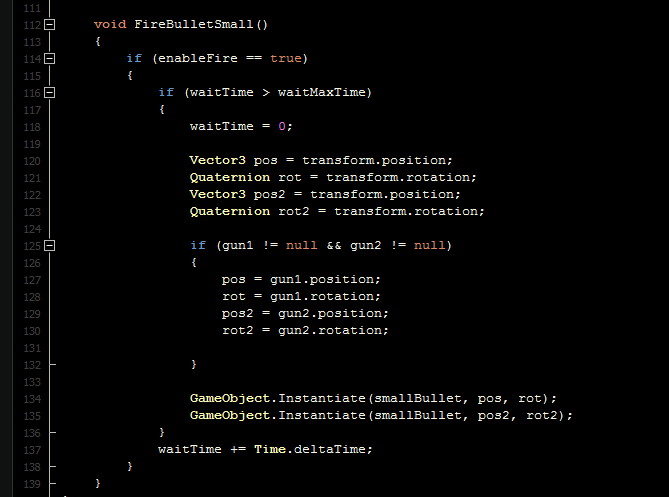
FiringCode

Initially I had some real issues that I managed to sort, what happened is that I had to use a position that I specified as a transform to use a point to spawn a bullet that would appear to propel its self from the gun. I had 2 guns, so I needed to empty positions just in front of the guns. I would use those objects to specify the location and rotation for a bullet to be instantiated. Then I simply instantiate a bullet and the given position. I finally use a timer that works to calculate a wait period before the player can fire again. It is very small about 2/10 of a second. At first when I tested this I left the collider on the offset transform point, which meant every shot I fired would spawn in the position of that game object and collide with the collider and trigger a recoil on the plane and really mess with the handling. However this was fixed with the disabling of the collider.

Flying Leap Controller

After some real trial and error and reading some of the documentation for how the leap motion manipulates data, I have been able to read and use several Unity functions to calculate a smooth rotation based on the distance between hands and the height/depth.

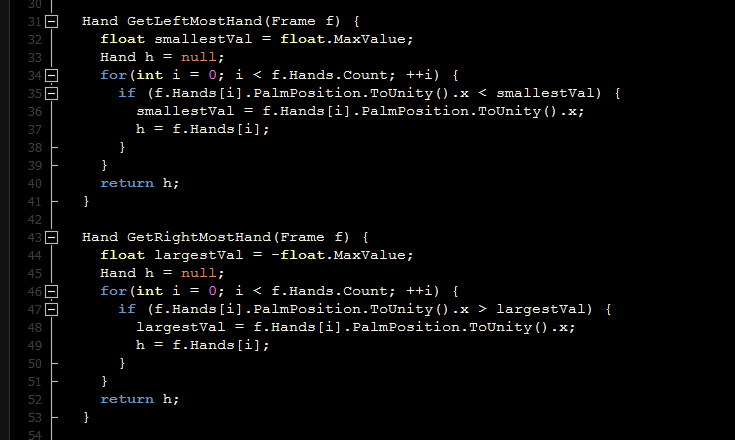
I retrieve the hands individually, and store them per frame like so:

GetHandsFrameCode

During the FixedUpdate I then begin to calculate the positioning of the palm or the angle, then I calculate the distance between the hands, and finally use the previous to calculate the rotation to allow for a banking feel when you want to turn left and right, up and down. I then take the speed and apply a velocity to the rigidbody of the space ship. The working code so far looks like this:

Flying Calculation

After some testing on the space ship I like the results. I will be using this from now on, I don’t doubt I will be having to add more code to in the future but for now it works. 🙂

Space Ship

That’s right, a space ship, well sort of. I’m no graphics designer or modeler which will become apparent as you see my work, however I have put together a prototype ship in Unity just to use for testing purposes. I will be using this ship as the controller, or more specifically the object to be controlled by the player, using the Leap Motion sensor.

Ship (First Concept)

See like I said nothing special, however its early days and after all this is just a prototype. What I will be doing is next is creating a script that will allow me to use 2 hands to try and fly this module around the air space.

Design Ideas

Following on from the previous post, I will begin to blog some ideas to what the game purpose, mechanics and graphics will be like. So the purpose, well like I said before a flying game in which the player controls some sort of aircraft or space ship would be awesome. As the player can use both hands to simulate the angle and direction of the craft I feel this would fit quite well. The aim I think could be either to destroy a variety of enemies or objects along a given path, or race through a number of portals/checkpoints in  given period of time etc.

Mechanics: well flying using your hands to control like I just mentioned, however it would awesome if you could also fire with your hands. I’m not sure if this combination can be achieved but I will try and turn this to a reality.

Graphics: Or theme, well i’m no graphic designer or 3D modeler, so the simpler the better in my eyes. Even though some of the best games ever made have had a unique style of graphics and pulled it off well so why can’t I? I will no doubt be using cubes in unity and other shapes but I would like to keep to a ‘blocky’ world so that it appears to follow a style through out the play  space.  I think the setting would have to be some sort of space world, planet or whatever that fits nicely to the space ship feel.

Next thing is to begin trying to get a working flying object in Unity!

Leap & Unity 4 SDK

I will be using Unity as the development tool for this project, so first things first I would have to install Leap Motion SDK to Unity so I can begin using it. This was no problem despite using the free version of Unity (rather than the pro version).

The next thing I did was to download leap motions own demo pack for unity, in which they ‘showed off’ some of the games they built using the Leap Motion device. Here are a couple of images they provide to show the games they have made:

I fell in love with the flying demo and saw the potential to this and how this could be improved to basically make a fun, thrilling and all round exciting game! The next step for me was to think how could make a flying controller in to a game!